I've been working with Morningstar charge controllers since 2019. Started out as a system integrator for off-grid cabins in Colorado. I've installed probably 200 of these things by now—everything from the tiny SHS to the Tristar MPPT-60.
I've also made pretty much every mistake you can make with them. Some were cheap lessons. A few were not.
So here's a collection of the questions I wish I'd asked before I started. The answers are what I learned the hard way.
1. How do I wire a Morningstar charge controller for the first time?
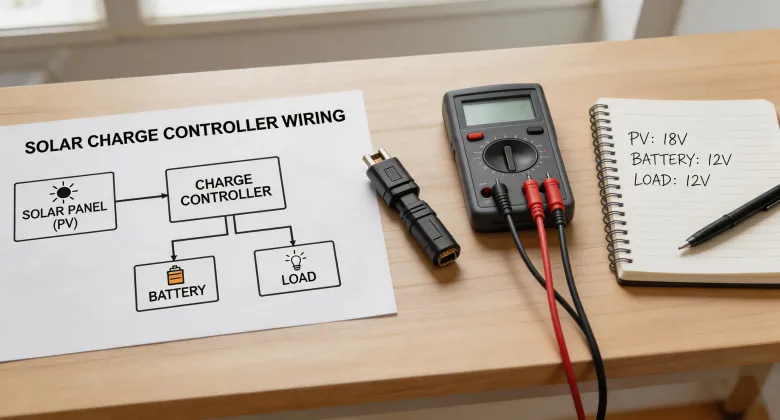
Short answer: Battery first, then solar, then load. Always in that order.
I know it seems obvious when you read it in the manual. But in 2021, I was installing a Tristar MPPT-45 on a remote job site—cold, snowed over, and my fingers couldn't feel a thing. I hooked up the solar panels first, because that's what I did last. The controller didn't fry, but it started a sequence of error codes I wasn't prepared for. I'd like to tell you I fixed it fast. Truth is, I spent 45 minutes re-reading the manual in the truck while the panels baked in the sun.
Here's the rule I use now:
- Step 1: Connect battery (controller boots up)
- Step 2: Connect solar array (controller recognizes source)
- Step 3: Connect loads (or not—some controllers don't need it)
The Morningstar manual says the same thing. I just didn't believe it mattered until I started troubleshooting a problem I created.
2. Do I really need the Morningstar login app?
Honest answer: it depends. If you're a homeowner with one system in your garage, the physical display is fine. But if you're managing multiple installs—or a client's system remotely—the app changes the game.
I fought this for a long time. First because I didn't want another app on my phone. Second because I'm old school. But in March 2023, I got a call from a client whose battery bank wasn't charging. He was 4 hours away. Without the app, I'd have had to drive out there, look at the display, and drive back.
Instead, I opened the Morningstar login app, checked the controller remotely, and saw the issue: a tripped breaker between the panels and controller. He reset it based on my instructions, and the system was back online in 10 minutes.
Take it from someone who wasted a full day on that same drive before: the app isn't a nice-to-have. It's the difference between a 10-minute fix and a 10-hour road trip.
3. What's the deal with the Copernicus solar system?
I get this one a lot. The Copernicus system is Morningstar's hybrid inverter—it's not a charge controller, but it integrates with one. It manages AC and DC inputs for solar + battery + generator setups.
Where people get tripped up: they assume the Copernicus includes a charge controller built in. It does not. You still need a separate MPPT or PWM controller for the solar array feeding the DC bus.
I made this assumption myself in 2022. Ordered a Copernicus for a project, didn't order the controller. The installation day arrives, and I'm staring at the box going, 'Wait, where's the charge controller?'
That mistake delayed the project by a week and cost $300 in expedited shipping on the controller. Plus a very unhappy client.
Here's the bottom line: The Copernicus is a battery inverter + generator interface. The solar charge controller is separate. Budget for both.
4. Is the EB3A + 200W solar kit any good?
I've seen this kit mentioned in a lot of forums, and I'm going to be direct: it's not a Morningstar product. The EB3A is a Jackery unit. The 200W solar panel kit is usually a generic foldable panel set.
If you're asking whether it works with a Morningstar controller—no, it doesn't need one. The EB3A has a built-in controller. So if you're looking at this as a starter kit for camping or emergency backup, go for it. But if someone's telling you that you can plug a Morningstar controller into an EB3A to upgrade it, they're wrong.
I had a newbie installer ask me this in 2024. He'd bought the kit, then bought a Tristar MPPT, thinking he'd get better charging. The Tristar couldn't even connect to the EB3A—they're completely different architectures.
My rule: If you want a Morningstar system, buy Morningstar components. Don't try to retrofit a controller into an all-in-one portable station. It's not how it works, and you'll waste money.
5. How do I find my Morningstar product registration or login?
There's been some confusion about this, especially after the app updates in late 2023. Here's the breakdown:
- Morningstar login app: This is the remote monitoring app. You use it to connect to a Tristar ETL or ProStar controller that's connected to the internet via a cellular or Ethernet module.
- Morningstar store: This is the web portal where you register products, download manuals, and request RMA (returns). It's not for buying things—it's for support.
- Product registration: You do this on the Morningstar store. You'll need the serial number from the controller's label. I recommend doing it right after installation. I didn't on an early install, and when the controller failed 18 months later, I had to dig through old invoices to prove purchase.
The surprise for me: the app and the store use separate logins. You can't register a product in the app. And you can't monitor a system from the store. They're two different tools.
6. What happens if I size the solar array wrong?
A lot depends on wattage. But the mistake I see the most—and made myself—is oversizing the array relative to the controller's maximum input voltage.
Morningstar controllers have a hard limit on PV input voltage. The Tristar MPPT-45, for example, has a max of 150 VDC. If you exceed that, even briefly, the controller can shut down permanently.
In August 2022, I installed a Tristar MPPT-60 with a 2,000W array. Looked good on paper. But I was working in high altitude (10,000 ft) in Colorado. The cold temperature coefficient bumped the voltage above spec on a sunny winter morning. The controller didn't fail immediately, but I saw performance drops. Took me three weeks to figure out why.
The fix: My spec now always includes a 15% margin on voltage. If the controller says max 150 VDC, I design for 130 VDC at max temperature. For more guidance, see Morningstar's application note on PV array sizing—they've got a PDF that walks through the math.
The takeaway
None of these mistakes were catastrophic. But they were expensive, time-consuming, and embarrassing. If you're setting up a Morningstar system for the first time—or the tenth—the checklist above will save you the same pain I went through.
Prices as of January 2025; verify current specs with Morningstar. And if you're staring at a controller and unsure which port connects where: battery first. I mean it.